What Is Phantom Wallet? The Complete 2026 Guide
Phantom started in 2021 as a "Solana wallet" and, thanks to its clean interface and fast transaction experience, became the default choice for Solana users buying and selling tokens, managing NFTs and connecting to DApps. Five years later it supports 8 chains, Bitcoin Ordinals, built-in swaps, staking and a cash account, and in October 2026 it brought Kalshi prediction markets to US users.
That expansion has made it one of the most practical self-custodial wallets for everyday crypto users — and it has also enlarged the attack surface. This article covers which networks Phantom supports, how to set it up, what it costs, whether it is safe, and where it still falls short.
Key takeaways
- Phantom is a self-custodial wallet launched in 2021. It is at its best on Solana and now supports multiple chains.
- It supports Solana, Ethereum, Bitcoin, Base, Polygon, Sui, HyperEVM and Monad, including Native SegWit, Taproot and Ordinals.
- Core features include swaps, SOL staking, NFTs, DApps, Ledger, transaction previews and scam warnings.
- It is a hot wallet: safety depends on how you store your seed phrase, verify domains and manage approvals — not on the app itself.
What is Phantom Wallet?
Phantom is a self-custodial crypto wallet available as a browser extension (Chrome, Brave, Edge, Firefox) and a mobile app (iOS, Android). Self-custodial means the private keys are in your hands: Phantom does not hold your assets and cannot help you recover them if you lose your seed phrase.
It launched in 2021 with Solana as its main battlefield and quickly became the default wallet for Solana apps such as Jupiter, Raydium, Orca, Magic Eden and Tensor. It later added Ethereum, Polygon, Base, Bitcoin, Sui, HyperEVM and Monad, along with fiat on-ramps, a cash balance and prediction markets.
The result is a wallet that increasingly resembles a "financial interface" rather than a "safe". That is convenient for active users, but every feature — swaps, bridging, DApps, prediction markets — adds another entry point that phishing sites can imitate.
Which networks and assets are supported?
As of mid-2026, Phantom supports 8 networks. The Solana experience is the most complete; EVM coverage is narrower than MetaMask or Rabby, and Phantom does not let users manually add custom networks.
| Network | What you can do | Notes |
|---|---|---|
| Solana | SOL, SPL tokens, NFTs, staking, DApps | Most complete experience |
| Ethereum | ERC-20 tokens, NFTs, DApps | Only partial EVM functionality; cannot fully replace MetaMask |
| Bitcoin | BTC transfers, Native SegWit and Taproot | Ordinals supported, but no advanced UTXO tools |
| Base | Base tokens and apps | Good for L2 interaction |
| Polygon | Polygon tokens and NFTs | Partial asset support |
| Sui | Move ecosystem assets and apps | Newer ecosystem support |
| HyperEVM | Hyperliquid ecosystem assets | Niche but growing |
| Monad | Monad ecosystem assets | A newer chain |
Supported networks change; check Phantom's official support page before transferring.
Bitcoin support is convenient but not a replacement for a dedicated Bitcoin wallet. Phantom supports Native SegWit addresses (starting with bc1q) and Taproot addresses (starting with bc1p), and it can display Ordinals. It has no coin control or granular UTXO management, so long-term Bitcoin storage is better suited to a hardware wallet or a Bitcoin-specific wallet.
How to set up Phantom
Setup takes only a few minutes. What really matters is where you download it from and how you store your seed phrase.
- Download from the official site: phantom.com or the official app stores. Do not click search ads, and do not use links from unknown Discord/Telegram sources.
- Create a new wallet: set a strong password, enable biometrics on mobile, and write the 12 or 24 seed words on paper.
- Never share your seed phrase: Phantom will never ask for it. Anyone who does is a scammer.
- Connect a Ledger: use a hardware wallet for large holdings. Phantom supports Ledger in its desktop and mobile flows.
- Test with a small amount first: make a small test transaction before moving in large funds.
If you import an existing wallet, be sure to confirm the derivation path and network. Sending assets to the wrong address type (for example, treating an EVM address as a Solana address) can cause permanent loss.
Main features: swaps, staking, NFTs and prediction markets
Phantom has long been more than a storage tool. Core features include:
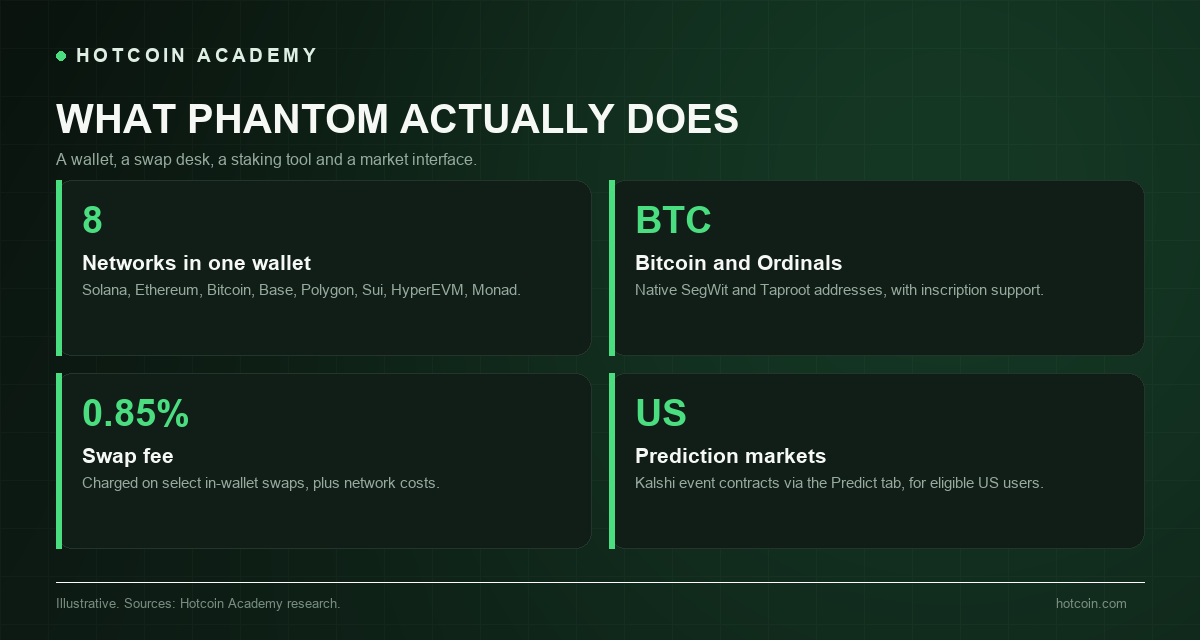
- Built-in swaps: trade supported tokens directly inside the wallet; some swaps charge a 0.85% fee, plus network fees and price impact.
- SOL staking: delegate SOL to validators and track rewards in the app.
- NFTs and Ordinals: view, manage and trade Solana NFTs and Bitcoin inscriptions; spam NFTs can be burned or hidden.
- DApp connections: connect to Solana and EVM apps, with transaction previews and scam warnings.
- Cross-chain bridge: move assets between chains; bridge fees are typically 0.1% to 0.5%, plus network fees.
- Kalshi prediction markets: from October 2026, eligible US users can trade event contracts via the Predict tab; Kalshi handles matching and settlement, and positions appear as SPL tokens.
The Kalshi integration shows where the wallet is heading: from "a place to store private keys" to "a distribution channel for regulated financial products". That also brings new risks, because prediction markets have their own rules, liquidity and loss structures.
Phantom's fees
Phantom itself is free. You pay for using features, not for downloading the app.
| Fee | Amount | Notes |
|---|---|---|
| Downloading the wallet | Free | Browser extension and mobile app |
| Swap fee | 0.85% on some swaps | Plus network fees and price impact |
| Bridge fee | 0.1% to 0.5% | Higher for exotic pairs or low-liquidity pools |
| Network fee | Variable | Paid in the source chain's native token |
| Staking | Validator commission | Set by the validator, not charged by Phantom |
| Fiat on-ramp | Third-party fees | Varies by region, e.g. MoonPay, Coinbase Pay |
Fees may change; confirm the actual amount in the app before signing.
Is Phantom safe?
Phantom is a hot wallet connected to the internet. It offers some useful protections — transaction previews, scam detection, malicious domain warnings, spam NFT tools and Ledger support — but none of them can replace the user's own discipline.
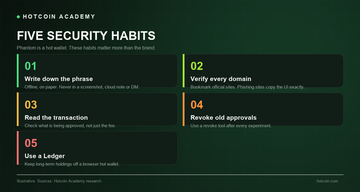
- Phishing is the main risk: fake Phantom websites and fake support agents are common. Bookmark the official site, and never enter your seed phrase on a web page.
- Approvals persist: a single signature can leave spending permissions in place after you close the page. Revoke unused approvals regularly.
- Blind signing is dangerous: if you cannot understand what a transaction does, do not sign it.
- Separate hot and cold storage: keep long-term assets in a hardware wallet and only active funds in Phantom.
Phantom also cannot protect a compromised device or a malicious browser extension. For large holdings, a clean computer and a hardware wallet matter more than any in-app setting.
Phantom vs MetaMask vs Solflare: which to choose?
| Wallet | Best for | Shortcomings |
|---|---|---|
| Phantom | Users who want one wallet for Solana, Bitcoin and some EVM chains | Limited custom networks and EVM coverage |
| MetaMask | Advanced EVM users, custom networks, hardware wallets | Weaker Solana experience, more complex for beginners |
| Solflare | Native Solana staking and advanced features | Less multi-chain coverage |
The best wallet depends on which chains you actually use and whether you value convenience or control more.
The 2026 shift: from wallet to financial app
Phantom's 2026 roadmap points in one direction: becoming the main gateway to on-chain finance. The Kalshi integration, cash balance, swaps, staking and multi-chain support all reduce the number of apps users need to open. That is good for adoption and convenient for users who understand the risks.
But it also concentrates risk. A wallet that simultaneously holds assets, executes trades and connects to regulated markets becomes a more valuable target for phishing and malware. The more features a wallet has, the more important it is to verify "what you are signing".
Troubleshooting common issues
Most Phantom problems come from networks or approvals rather than the wallet itself. Here are the four most common.
- Wallet won't connect: make sure the DApp is on a supported network, refresh the page, and check whether it uses WalletConnect or an injected provider.
- Token is missing: confirm the network is correct and manually add the token's mint address. Solana tokens do not automatically appear on Ethereum.
- Transaction is stuck: check its status on a block explorer, then send a replacement transaction with a higher priority fee. Do not blindly resend the same nonce.
- Seed phrase is lost: Phantom cannot recover it. If the wallet is still unlocked, move the assets to a new wallet immediately.
If you encounter a signature you do not understand, stop and ask through official channels. Anyone posing as "support" who asks for your seed phrase is not support.
Common misconceptions
- Taking screenshots of your seed phrase, storing it in cloud notes, or keeping it in a browser-synced password manager.
- Downloading Phantom from search ads or links sent by "support".
- Approving transactions without reading them because the fee looks low.
- Using the same hot wallet for experiments and long-term savings.
FAQ
Is Phantom free? Yes. The wallet itself is free to download and use. You only pay when using features: network fees, the 0.85% fee on some swaps, bridge fees and third-party on-ramp fees.
Does Phantom support Bitcoin? Yes. Phantom supports Bitcoin Native SegWit and Taproot addresses, as well as Bitcoin Ordinals. It is not a full advanced Bitcoin wallet and has no granular UTXO tools.
Can Phantom be hacked? Phantom is a non-custodial wallet, so there is no centralized account to hack. The real risks are phishing, malicious approvals, compromised devices and stolen seed phrases. Good operational habits matter more than the wallet brand.
Does Phantom support Ledger? Yes. Phantom supports Ledger hardware wallets in some desktop and mobile flows, keeping private keys offline while using Phantom as the interface.
Which chains does Phantom support? As of mid-2026: Solana, Ethereum, Bitcoin, Base, Polygon, Sui, HyperEVM and Monad. Support changes, so check the official site before bridging or transferring.
Conclusion
Phantom has grown from a Solana-native wallet into a multi-chain financial app. For active users, its coverage and completeness are hard to replace — provided you treat it as a hot wallet and verify every interaction.
If you are new to self-custody, start with small amounts to get familiar with the approval flow, then migrate to a hardware wallet as your holdings grow. You can read more wallet and market guides at Hotcoin Academy.
Risk warning: This article is for educational reference only and does not constitute investment advice. Self-custody means you are responsible for your own private keys. Crypto assets are highly volatile and you may lose your entire balance.
Recommended
View more